
Custom CRM Development: When to Build, Costs and Features
 Binayak Ghimire
Custom CRM development makes sense when your customer data doesn't fit the contact, company and deal model that Salesforce and HubSpot are built around, or when your per-seat licences cost more each year than running your own system. For most Australian businesses a custom CRM costs A$50,000 to A$150,000 to build. If neither condition applies, configure an off-the-shelf CRM instead.
AI has moved both sides of that decision in 2026. Salesforce and HubSpot now charge for AI agents on top of seat licences, and AI-assisted development has made custom builds faster, though not free. A CRM someone built over a weekend with AI tools still isn't safe to run a business on.
We build custom software, and we still tell most small businesses to start on HubSpot, Pipedrive or Salesforce. The useful question is when they shouldn't.
When should you build a custom CRM?
Build a custom CRM when at least two of these are true.
Your work doesn't look like "deals"
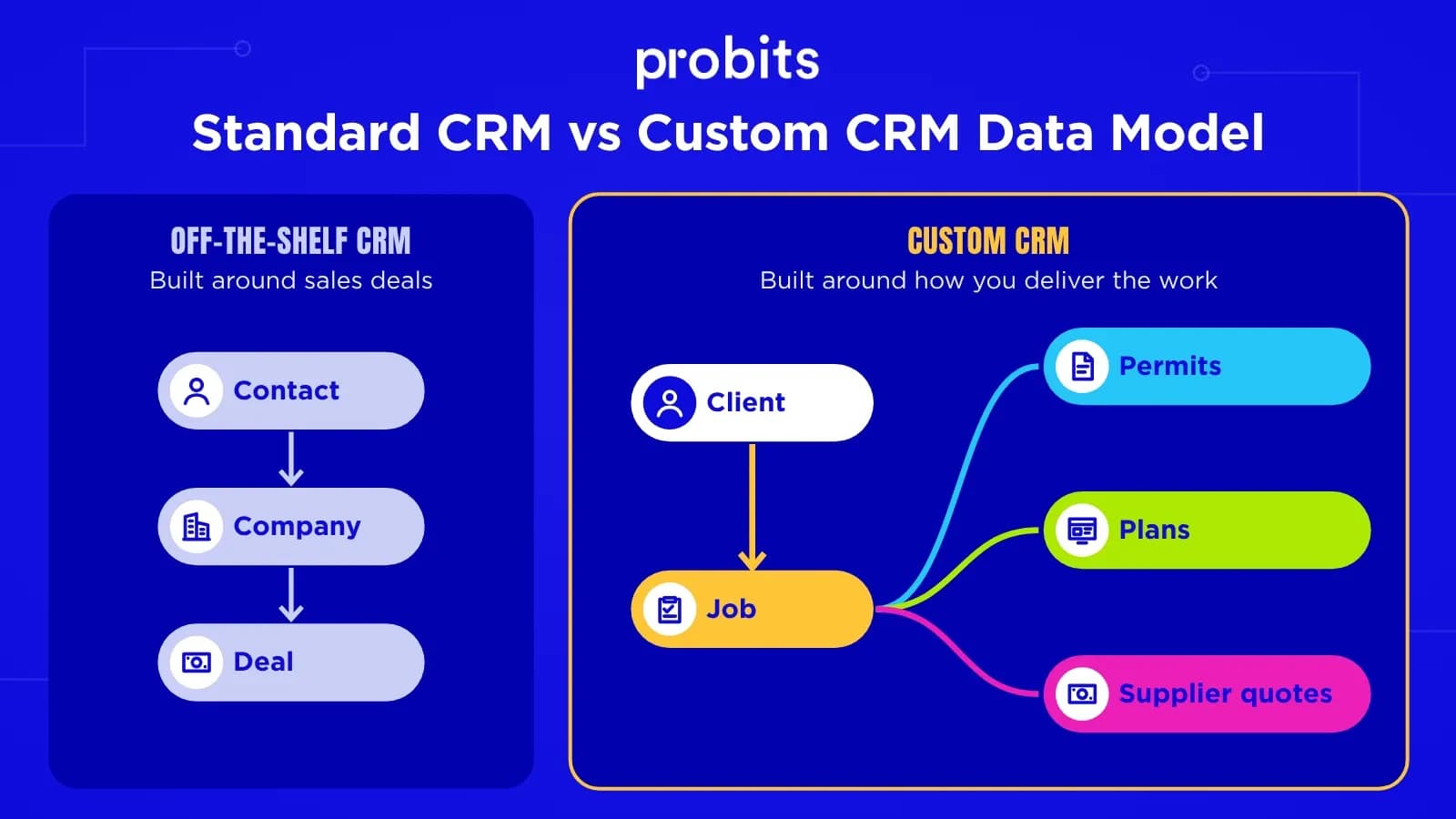
Off-the-shelf CRMs assume a simple shape: contacts belong to companies, and companies have deals that move through a pipeline. That fits a lot of sales teams.
It fits badly when the thing you manage is a job, a booking, a property, a student or a compliance approval. A traffic management contractor, for example, tracks jobs, permits, traffic plans and several suppliers quoting on each job. You can force that into "deals" with custom objects and plugins, but every report and screen fights the data model. When we built the unplanned job module for Unicorn Shift, the core records were jobs and supplier rates, not contacts and deals.
Per-seat licences have become a large line item
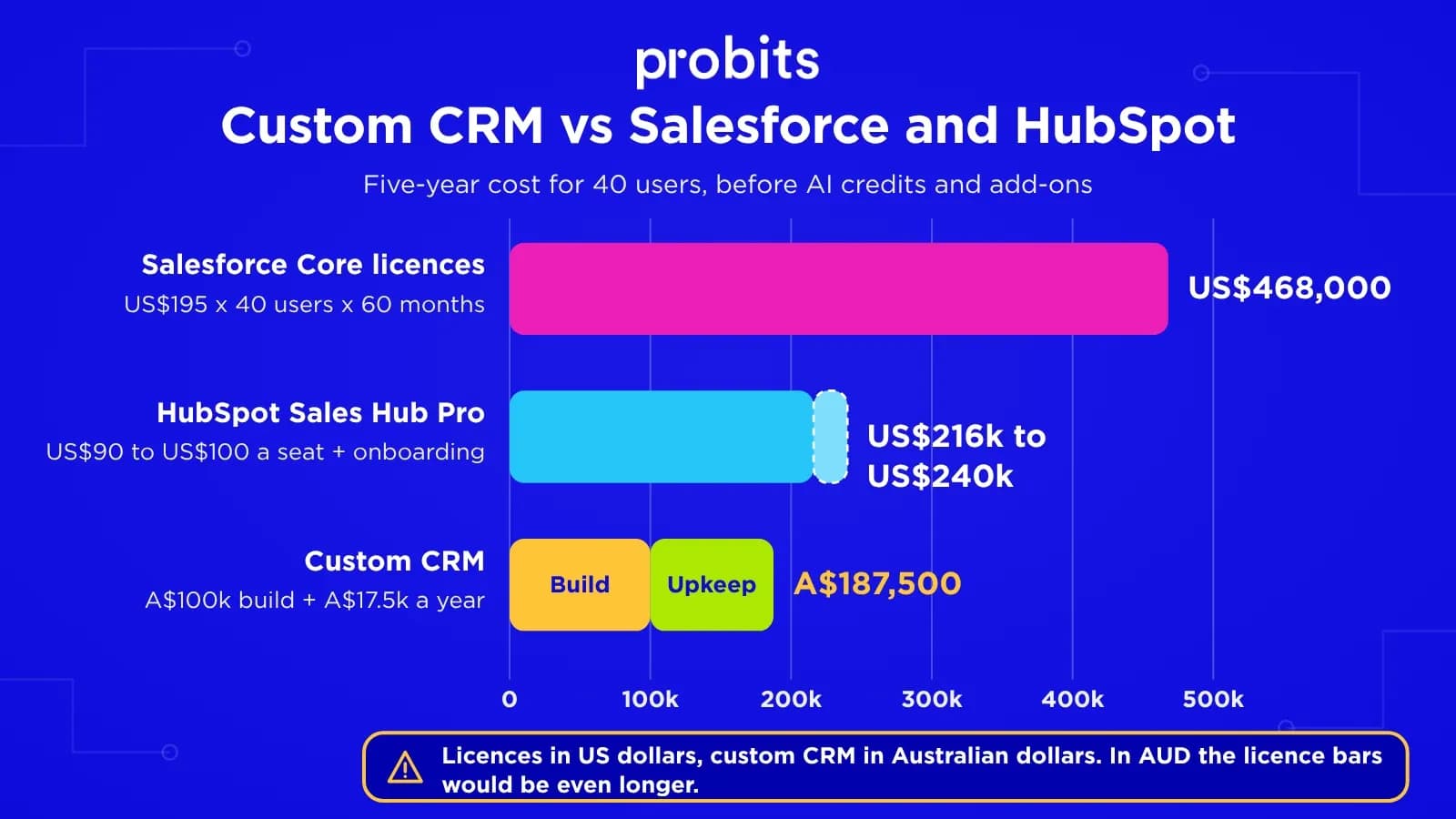
In September 2026 Salesforce replaced its Enterprise edition with a new Core edition at US$195 per user per month for new customers, up from US$175 (existing customers keep their legacy pricing until renewal). For 40 users that's US$93,600 a year, before add-ons and implementation partners. HubSpot's Sales Hub Professional is cheaper at around US$90 to US$100 per seat per month, plus a one-time onboarding fee, but it still grows with every hire.
A custom CRM has a fixed running cost that barely changes with headcount. The break-even point between SaaS vs custom software depends mostly on seat count and price per seat.
AI is now billed on top of seats. Salesforce's Agentforce agents use Flex Credits, roughly US$0.10 per action. HubSpot charges credits per outcome: 50 credits for each conversation its Customer Agent resolves and 100 for each lead its Prospecting Agent recommends, with extra credits at around US$10 per 1,000. The bill now grows with headcount and with how much work you hand to AI.
You're paying a consultant to make the CRM do your job
If you already spend tens of thousands a year on Salesforce consultants, custom objects, middleware and workarounds, you're building custom software on someone else's platform, and paying rent on it.
"If your team keeps a spreadsheet next to the CRM, that spreadsheet is telling you what the CRM should have been." - Co-founder, Probits
The CRM is part of the product
If customers or partners log in to see their own records (a client portal, a supplier portal, a marketplace), a custom system usually gives a better experience than exposing a licensed CRM.
When you shouldn't build a custom CRM
Small team, standard pipeline
Don't build if you have fewer than about 15 users, a standard sales pipeline, and no plans to give customers access. HubSpot's free and Starter tiers or Pipedrive will do the job for a fraction of the cost, and you'll be running next week.
No budget for maintenance
Don't build if you can't fund maintenance either. A custom CRM needs roughly 15 to 20% of its build cost each year in updates and fixes. If you're on the fence, score the decision with a build vs buy software framework before you commit.
The middle option: extend your existing CRM
Plenty of businesses land in between. Keep HubSpot or Salesforce for sales and marketing, and build a custom app for the part that doesn't fit, such as job scheduling, field service or a client portal, connected through the CRM's API.
This keeps the CRM's mature features (email sequences, marketing automation, reporting) and puts your money into the workflow that's actually unusual. The trade-off is two systems to keep in sync, so agree early which one owns each piece of data.
How AI is changing the build-or-buy decision
Two things changed between 2024 and 2026. Building software got faster, and off-the-shelf CRMs started charging for AI. Both shift the maths, though by less than the hype suggests.
AI-assisted development has shortened custom builds
Our developers use AI coding assistants every day. They write the repetitive parts of a CRM quickly: forms, list screens, filters, API endpoints and test scaffolding. That takes weeks off the routine parts of a build.
It hasn't made the hard parts cheap. Working out your data model, integrating with Xero or a legacy system, migrating messy records, setting permissions and testing still need people who understand your business. So AI mostly brings delivery dates forward and lets the same budget cover more features, but it hasn't halved what a well-built CRM costs.
Can you vibe-code your own CRM?
Tools like Lovable, Bolt, Replit and Cursor let a non-developer describe a CRM and get a working app within a day. Some small businesses are running on them: eMarketer reported a 70-person rugby club that replaced Salesforce and a ticketing service with AI-built tools and saved about US$100,000 a year.
That approach suits a prototype, a demo or a tool for three people. Be careful putting it into production. A CRM holds personal information, and AI-generated apps often ship with weak access control, no audit trail, no backups and code nobody on the team understands. Fixing one later can cost more than building it properly the first time. A sensible path is to vibe-code the prototype, test it with your team, then have developers rebuild or harden the parts you keep.
Vendor AI agents work best on standard data
Agentforce and HubSpot's Breeze agents can draft emails, qualify leads, answer customer questions and update records. If your data fits the contact, company and deal model, they're a good reason to stay on the platform.
They depend on clean data in the vendor's model, though. If your real work lives in custom objects, side spreadsheets and plugins, the agents see part of the picture and you pay per credit for weaker answers. A custom CRM built around your actual records gives AI models better context to work with.
Your CRM is becoming the data source for AI assistants
Staff increasingly ask ChatGPT, Claude, Copilot or Gemini for answers instead of opening the CRM. HubSpot now runs a hosted MCP (Model Context Protocol) server so those assistants can read and update CRM records within each user's permissions.
A custom CRM can do the same. Build a clean API from the first release, then add an MCP server so AI assistants and agents can look up jobs, clients and quotes without anyone pasting customer data into a chat window. Apply the same permissions and audit logging to every AI read and write as you would to a person.
What this looks like in practice
Take the traffic management contractor from earlier. On a standard CRM, each job is squeezed into a "deal", and the vendor's AI agent sees deal stages and contact notes. It can draft a follow-up email, but it can't tell you that a job starting Monday still has no approved traffic plan.
On a custom CRM built around jobs, permits and supplier quotes, the same kind of model can do far more useful work:
- Read supplier quotes as they arrive by email and attach the price, dates and conditions to the right job
- Flag jobs where a permit or traffic plan is missing a set number of days before the start date
- Compare quotes on a job and summarise the differences for the operations manager to approve
- Give the project manager a one-paragraph morning brief on jobs that changed overnight
Today's models can already do all of this, as long as the data is stored as jobs, permits and quotes. A system built around your own records gets you that shape from the start.
How much does custom CRM development cost?
In Australia, a custom CRM usually costs A$50,000 to A$150,000 to build, depending on how many user roles, integrations and portals it needs.
| Scope | Typical build cost | Typical timeline |
|---|---|---|
| Internal CRM for one team: contacts, jobs, pipeline, tasks, reporting | A$50,000 to A$80,000 | 3 to 4 months |
| Business CRM with integrations (Xero, email, calendar) and several roles | A$80,000 to A$120,000 | 4 to 6 months |
| CRM plus client or supplier portal, mobile access, automation | A$120,000 to A$150,000+ | 6 to 9 months |
Running costs after launch
After launch, budget 15 to 20% of the build cost each year for maintenance, plus hosting. For a A$100,000 CRM that's roughly A$15,000 to A$20,000 a year, a fixed amount whether you have 20 users or 80. If you add AI features, add the model provider's usage bill too. It's usually small next to licence fees, but set a monthly cap and watch it. A focused internal CRM is usually built by three to five people: developers, a QA engineer and a project manager.
These ranges match typical custom software development costs in Australia, where a custom CRM or client portal usually sits at A$50,000 to A$150,000.
What AI features add to the cost
A single AI feature, such as call summaries or turning emailed documents into records, usually adds one to three weeks of development to a custom CRM. Most of that time goes on things other than the AI call itself: testing on your real data, a screen where staff can check and correct the output, fallbacks for when the model gets it wrong, and logging.
Running costs are usage-based. A team processing a few hundred emails, calls or documents a day typically pays tens to low hundreds of dollars a month in model fees, which is far below what a per-seat AI add-on costs for 40 users. Costs climb if you send whole mailboxes or long recordings through the most expensive models, so pick the smallest model that does each job well.
What features should a custom CRM have?
Scope the first version as a minimum viable product: build it around the records your team works with every day, then add the rest once people are using it.
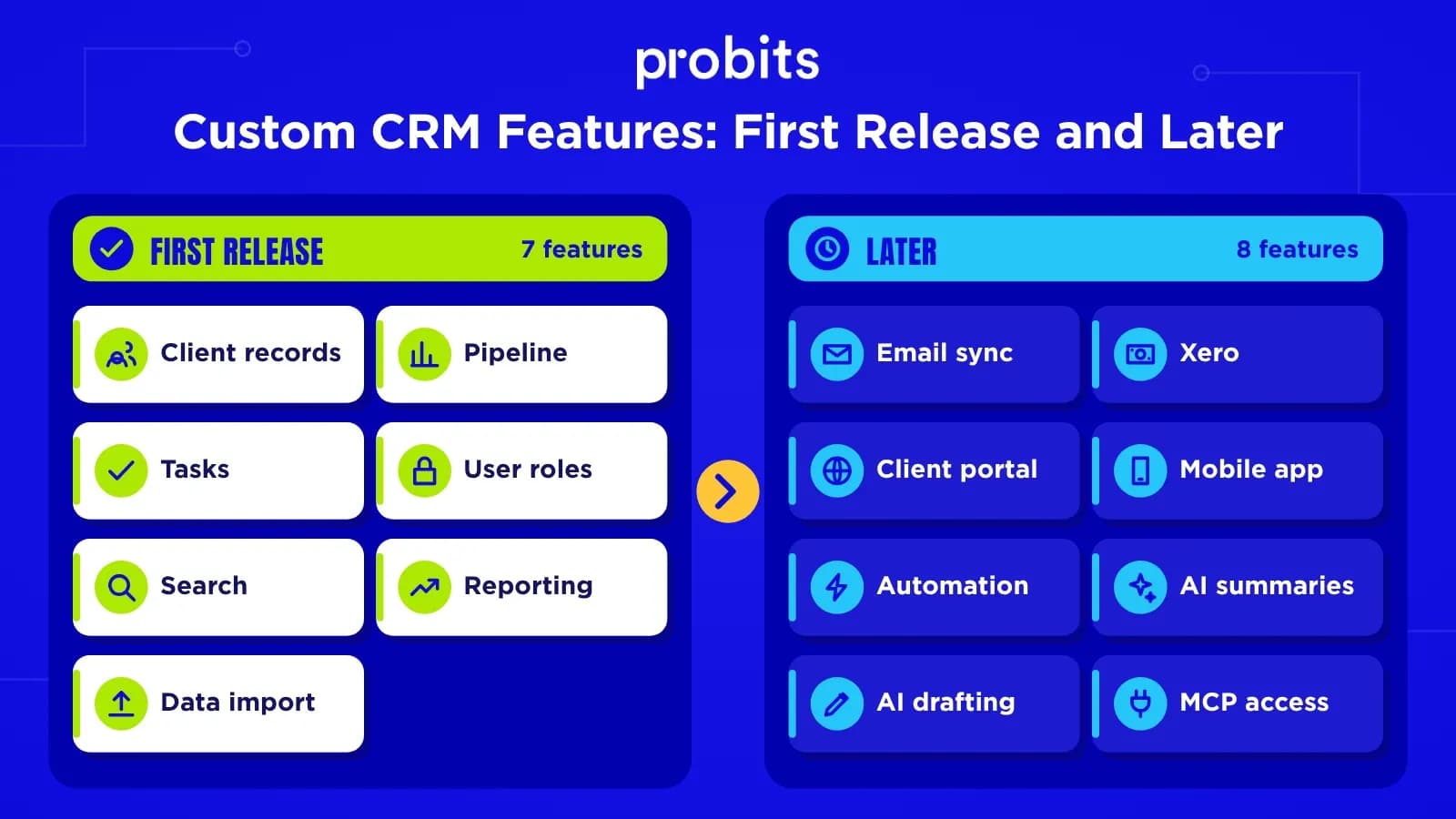
First release
- Records for your real objects (clients, jobs, properties, or whatever you manage) with the fields you actually use
- A pipeline or status board that matches your process stages
- Tasks, reminders and an activity history on each record
- Role-based access, so sales staff, operations and management each see what they need
- Search and filters that work across your own fields
- Basic reporting: pipeline value, jobs by stage, activity by person
- Import from your current spreadsheets or CRM
Later releases
- Two-way email and calendar sync (Microsoft 365 or Google Workspace)
- Accounting integration, usually Xero or MYOB, so quotes and invoices don't get re-keyed
- A client or supplier portal
- Mobile access for field staff
- Automation rules, such as follow-up tasks when a job changes stage
- AI features such as call summaries, drafted follow-ups and document capture (see below)
AI features worth building into a custom CRM
Most AI features in a CRM are calls to a model API (from OpenAI, Anthropic, Google or similar, some of which can run in Australian cloud regions) wrapped around your own data. You pay per use, often cents per task, rather than a per-seat AI add-on. The ones that pay back fastest:
- Call and meeting summaries saved to the client or job record
- Drafted follow-up emails and quotes for a person to check and send
- Turning inbound emails, PDFs and web forms into structured records instead of re-keying them
- Enquiry triage: routing new leads or jobs to the right person with a suggested priority
- Plain-English search, such as "open jobs in Parramatta waiting on a permit"
- An API and MCP server so staff can use the CRM from ChatGPT, Claude or Copilot
Keep a person in the loop for anything that significantly affects a customer, such as declining an application or changing a price. The federal government's Guidance for AI Adoption recommends keeping human control over AI decisions, and from December 2026 automated decisions also carry privacy disclosure duties (see the next section). If you want to test an AI feature before committing to a full build, scope it as an AI MVP.
What not to build yourself
Resist building marketing automation from scratch. Sending bulk email well (deliverability, unsubscribes, templates) is a product in itself. Connect a tool like Mailchimp or HubSpot Marketing instead.
How to make a custom CRM ready for AI
Whether you add AI features in the first release or two years later, a few design choices decide how well they'll work. They cost little to get right at the start and a lot to retrofit.
- Store job type, status, suburb, value and dates as proper fields. AI can read notes, but reports, rules and agents work better on structured data.
- Keep every email, call, status change and file against the record it relates to, with timestamps. Summaries and next-step suggestions draw on that history.
- Keep one record per real client or job. Duplicates and half-merged records confuse people and models alike, so build duplicate detection into imports and data entry.
- Make every action a person can take available through an authenticated API. AI features, MCP servers and future integrations all sit on top of it.
- Let each AI feature inherit the permissions of the user it acts for, so it sees only what that user can see. Never give it a master account.
- Log each AI suggestion and action, who accepted it and what they changed. You'll need that log for disputes, for improving prompts and for the privacy obligations below.
If you're moving off Salesforce or HubSpot, the migration is the best chance you'll get to clean this up. Budget time to de-duplicate and restructure the data as well as copy it across.
Australian requirements to build in from day one
A CRM holds personal information, so build these in from the first release rather than retrofitting them.
- Consent and unsubscribe tracking. The Spam Act 2003 requires consent before sending commercial emails or SMS, clear identification of the sender, and a working unsubscribe. Store consent with each contact.
- Privacy Act obligations. If your business is covered by the Privacy Act (generally turnover over A$3 million, plus some smaller businesses such as health providers), you need to manage access, correction requests and data breaches under the Australian Privacy Principles.
- Data hosting. Hosting in AWS Sydney or Azure Australia East keeps customer data onshore, which many clients now ask about.
- Audit history. Record who changed what and when. It makes disputes and data-breach investigations far easier.
- Automated decision disclosures (from 10 December 2026). New APP 1.7 to 1.9 under the Privacy Act require your privacy policy to explain when a computer program uses personal information to make, or substantially help make, decisions that could significantly affect someone's rights or interests, such as approving an application, setting a price or refusing a service. If your CRM auto-scores, approves or rejects people, keep a register of those decisions so the privacy policy stays accurate. The obligation stays with you even when the AI comes from a vendor.
- AI providers and personal information. Check where each AI service processes customer data, whether it trains on that data, and what the contract says. The OAIC recommends against entering personal information, especially sensitive information, into publicly available AI tools.
Frequently asked questions
How much does it cost to build a custom CRM?
A custom CRM in Australia usually costs A$50,000 to A$150,000 to build, depending on user roles, integrations and portals. Ongoing maintenance adds roughly 15 to 20% of the build cost each year, plus hosting.
Is a custom CRM better than Salesforce or HubSpot?
It's better when your data doesn't fit the standard contact, company and deal model, or when per-seat licences cost more than running your own system. For a standard sales pipeline with a small team, Salesforce or HubSpot is usually cheaper and faster.
How long does it take to build a custom CRM?
A focused internal CRM takes about three to four months. A CRM with integrations, several user roles and a client portal usually takes six to nine months.
Can a custom CRM integrate with Xero and Microsoft 365?
Yes. Xero, MYOB, Microsoft 365 and Google Workspace all have APIs, so a custom CRM can sync invoices, contacts, emails and calendars. Integrations add to the build cost, so prioritise the ones that remove the most re-keying.
Can I build a CRM with AI tools instead of hiring developers?
You can build a working prototype with tools like Lovable, Bolt or Cursor in days. For a CRM that holds customer personal information and your whole team relies on, have developers review and harden it. Access control, audit history, backups, testing and Privacy Act obligations are where AI-generated apps usually fall short.
Should I use Salesforce Agentforce or HubSpot Breeze instead of building?
If your data fits the standard contact, company and deal model, try the vendor's agents first. They're billed per action or outcome on top of seat licences, so model the usage cost. If your core records are jobs, properties or approvals, a custom CRM with AI features built around those records usually gives better results.
How much do AI features add to a custom CRM?
Each AI feature typically adds one to three weeks of development, mostly for testing, review screens and logging. Running costs are usage-based model fees, often tens to low hundreds of dollars a month for a mid-sized team.
Will AI agents make CRMs obsolete?
No. AI agents need somewhere reliable to read and write customer records, permissions and history, and that is what a CRM is. What's changing is how people use it: more work happens through AI assistants and automations, and less through people clicking screens. That puts more weight on a clean data model and a good API.
What's the alternative to building a full custom CRM?
Keep an off-the-shelf CRM for sales and marketing and build a custom app only for the part that doesn't fit, such as job management or a client portal, connected through the CRM's API.